Protiva
FeaturesHow it worksPricingHelp
EN

Choose your country

What Protiva can do differs per country, because integrations, rules and taxes are national.

  • Netherlands
  • Belgium
  • Germany
  • Spain
  • France

Choose your language

  • Español
  • English
Log inBook a demo
Start for free
FeaturesHow it worksPricingHelp
Book a demoLog in
Home › Features › Invoicing
Feature · Invoicing

Your rent invoices itself

The right rent invoice every month, with extra costs and the deposit, created and sent automatically. Gapless numbering per portfolio and a tidy invoice register.
Try 30 days free →Book a demo
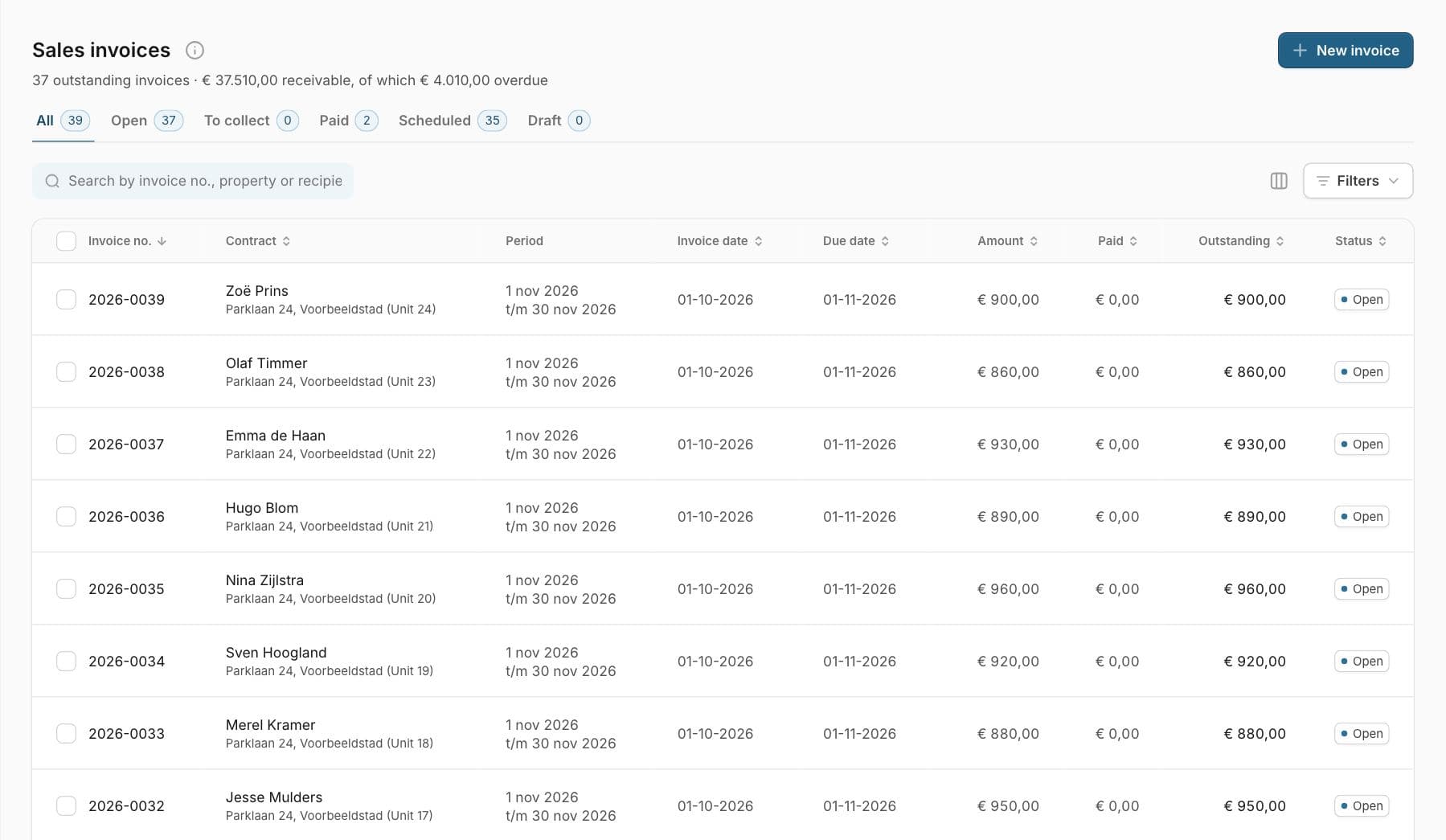
The list of sales invoices in Protiva, with the tenant, property, period, due date and amount of each invoice.
Protiva creates the rent invoices every month. For each invoice you see what has been paid and what is still open.
What it does

Invoicing without the manual work

🔁

Monthly, automatically

Based on your leases, Protiva creates and sends the rent invoices every month, automatically and as many days in advance as you like.

✉️

Email or post

Send by email or by post, one at a time or in bulk for a whole run of invoices at once.

🔢

Gapless numbering

Numbered per portfolio in a format you set, giving you an auditable register.

📄

Your own invoice template

Your own house style per portfolio, with your logo and payment details on the PDF.

Direct debit

Collect the money instead of waiting for a transfer

Per lease you choose whether the tenant transfers the money themselves or you collect it by direct debit. For direct debit, Protiva generates a SEPA file (pain.008) in one click that you upload to your own bank. You stay in control, without a separate collection agency.

Open direct-debit invoices automatically appear in the To collect overview. If a collection bounces, you process that from your bank connection and the invoice goes back to open.

  • ✓ Per lease: direct debit or self-transfer
  • ✓ SEPA direct debit file (pain.008) in one click
  • ✓ Invoices land in “To collect” automatically
  • ✓ Bounced collections handled from your bank feed

You upload the direct debit file to your bank yourself; Protiva does not collect on your behalf. Direct debit requires a mandate from your tenant and a direct debit contract with your bank.

Invoicing is in every plan, including Essential. See the complete offering for the property owner, or read how it works.

Frequently asked questions

Does Protiva create the rent invoices automatically every month?

Yes. Based on your leases, Protiva generates the monthly rent invoices with the base rent and any extra costs. Per portfolio you set whether they are created and sent automatically, and how many days in advance.

Can I have the invoices sent by post as well?

Yes. Invoices go by email by default, but you can also have them sent by post. Sending works one at a time or in bulk for a whole run of invoices at once.

How does invoice numbering work?

Protiva numbers gaplessly per portfolio, in a configurable format (including a portfolio code). That gives you a tidy, auditable invoice register, which is exactly what a tax authority wants to see.

Is the deposit included?

Yes. The deposit can be a separate invoice or spread over instalments. Anything that counts as a prepayment is excluded from turnover in your return figures.

Does Protiva support SEPA direct debit?

Yes. Per lease you choose direct debit or self-transfer. For the direct debit invoices Protiva generates a SEPA file (pain.008) that you upload to your own bank. Protiva does not collect on your behalf. You record the tenant's mandate on the tenant, the counterparty or the lease; bounced collections are handled through your bank connection.
Ready to manage your property the smarter way?

Start today for free. Add your first property and let Protiva do the paperwork.

Try 30 days free →Book a demo

Owners

  • All features
  • Free account
  • Private landlords
  • Investors
  • Invoicing
  • Long-term maintenance plan
  • Leases
  • Loans issued
  • Short-stay letting
  • Booking page
  • Book a holiday home
  • Documents & AI
  • Accounting & reports

Community management

  • For administradores de fincas
  • Register and shares
  • Budget and contributions
  • Meetings and decisions
  • Repairs and maintenance
  • Owners in an association
  • Pricing

Property management

  • For property managers
  • An administration per owner
  • Tenants, invoices and work
  • Switching to Protiva
  • Pricing

Tools

  • Amortisation schedule
  • Property rules by municipality

Protiva

  • Property management software
  • Pricing
  • Integrations
  • How it works
  • Platform stories
  • For tradespeople
  • About us
  • News
  • Creators & press
  • Become a partner
  • Contact
  • System status

The apps

  • Protiva PropertyApp StoreGoogle Play
  • Protiva TenantApp StoreGoogle Play
  • Protiva ServiceApp StoreGoogle Play
Protiva

The property platform that does the paperwork. All-in-one, affordable and hosted entirely in the EU.

Head officeProtiva B.V.
Goudstraat 2
2718 RC Zoetermeer
Chamber of Commerce 42132675
Spain officeC/ Pablo Picasso 1, 2º, 1 - Edificio Orihuela
03189 Orihuela Costa
Not a visitor address. Please get in touch at info@protiva.eu
© 2026 Protiva · Hosted in the EU 🇪🇺
PrivacyTermsAgreementData processingCookiesDelete your account
Log in

Choose your portal

Every role has its own environment. Pick where you want to log in.

Owner Properties, tenants, leases, invoicing and maintenance, plus the financial overview of your whole portfolio. app.protiva.eu → Managing agent Manage properties and tenants on behalf of owners. manager.protiva.eu → Community manager Owners' associations, members and units, contributions and annual accounts. manager.protiva.eu → Service provider Work orders and property details for suppliers and service companies. pro.protiva.eu → Tenant Your lease, payments, documents and requests in one place. my.protiva.eu →

No account yet?

Create an account

Which one are you?

Each role has its own account and its own portal. Pick yours and you create the right account straight away.

Your own property

Management firm

Trades

By invitation

You'll get an invitation by e-mail from your landlord. Open the link in that e-mail to activate your account. No invitation? Ask them to send it again, and check your spam folder too.

Already have an account or an invitation?

Account type:

Once you activate, the tradesperson behind this link is in your account straight away. You can remove them at any time. Already have an account? Log in and add the tradesperson →

By creating an account you agree to our terms of service and privacy policy.

30 days free, no credit card required.

Rather see it first? Book a demo →

Verification code
The code is valid for ten minutes. No text received? Check that the number is right and try again.

✓

Check your email

We have e-mailed you the activation link. It usually arrives within a minute. Click the link, choose a password and you are in. No e-mail? Check your spam folder as well.