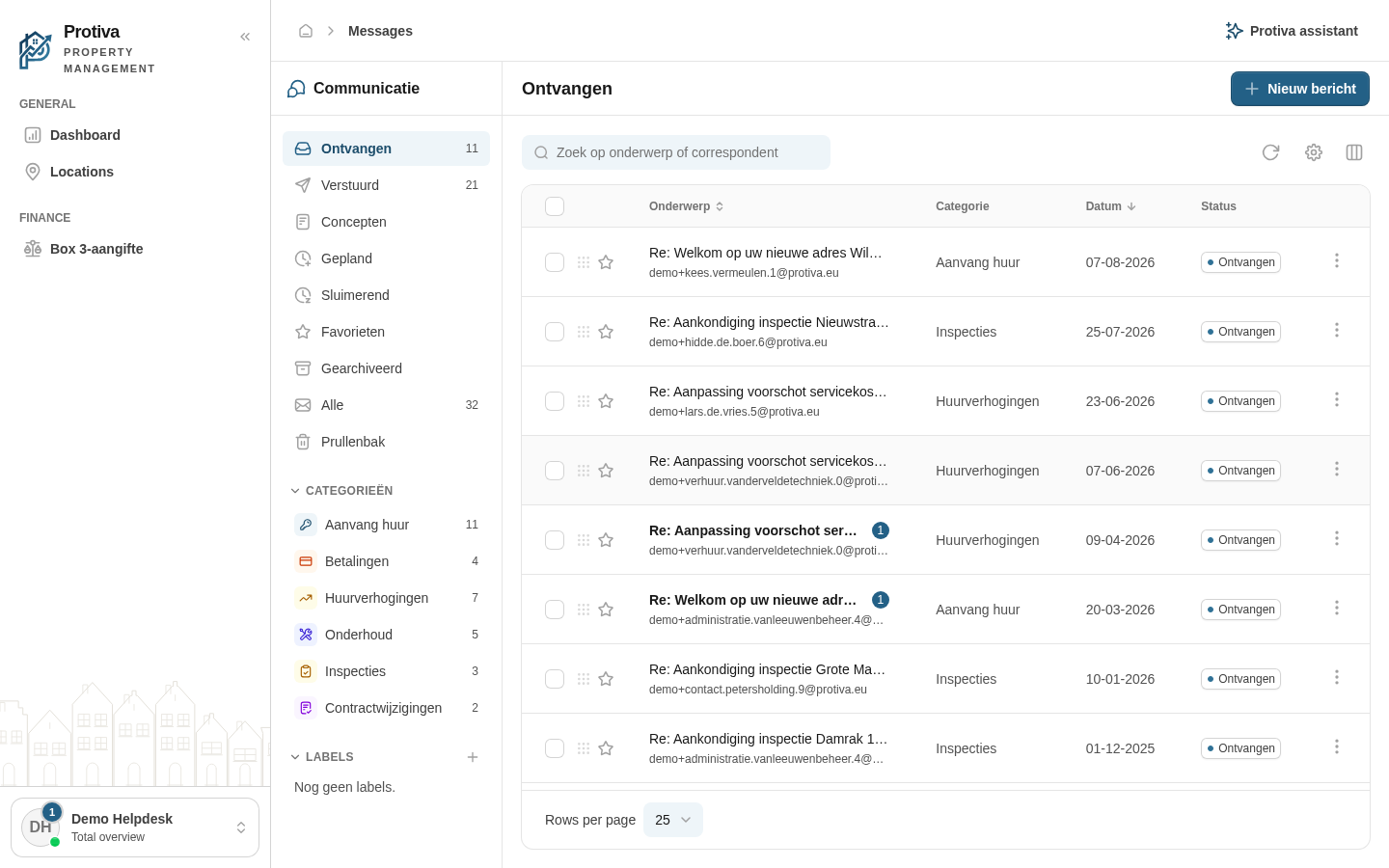
Archive, trash and restore conversations
You can archive conversations to remove them from your inbox without deleting them, move them to the trash when you no longer need them, or restore them if you discarded them by mistake.
Archive a conversation
Go to Messages;
- Click the action menu (three dots) on the right side of the conversation row you want to archive;
- Click Archive.
The conversation disappears from your inbox and can be found in the Gearchiveerd view in the sidebar.
Move an archived conversation back to the inbox
- Go to Messages;
- Open the Gearchiveerd view in the sidebar;
- Click the action menu (three dots) on the right side of the conversation row;
- Click Terug naar inbox.
Move a conversation to the trash
- Go to Messages;
- Click the action menu (three dots) on the right side of the conversation row;
- Click Naar prullenbak.
Restore a conversation from the trash
- Go to Messages;
- Open the Prullenbak view in the sidebar;
- Click the action menu (three dots) on the right side of the conversation row;
- Click Herstellen.
Permanently delete a conversation
- Go to Messages;
- Open the Prullenbak view in the sidebar;
- Click the action menu (three dots) on the right side of the conversation row;
- Click Definitief verwijderen;
- Confirm by clicking Definitief verwijderen in the dialog.
Note: permanently deleted conversations cannot be recovered.